

Windsurf AI has recently altered its functionality, moving the write mode feature from its free package to the paid subscription. This change has left many users puzzled and frustrated, especially those who rely on the tool for their projects. In this blog, we’ll explore the implications of this shift and provide guidance for users navigating these new limitations.
Introduction to Windsurf AI Changes
The recent changes in Windsurf AI have stirred up quite a bit of confusion among users. The transition of the write mode feature from the free to the paid version has impacted how users interact with the tool. Understanding these changes is crucial for effective usage.
The Previous Functionality of Windsurf AI
Before the changes, Windsurf AI allowed users to write files directly on their devices. This functionality was a significant advantage, enabling seamless project creation without manual intervention. Users could easily set up projects, create folders, and manage files automatically, making the tool highly accessible for non-programmers.
Error Messages Explained
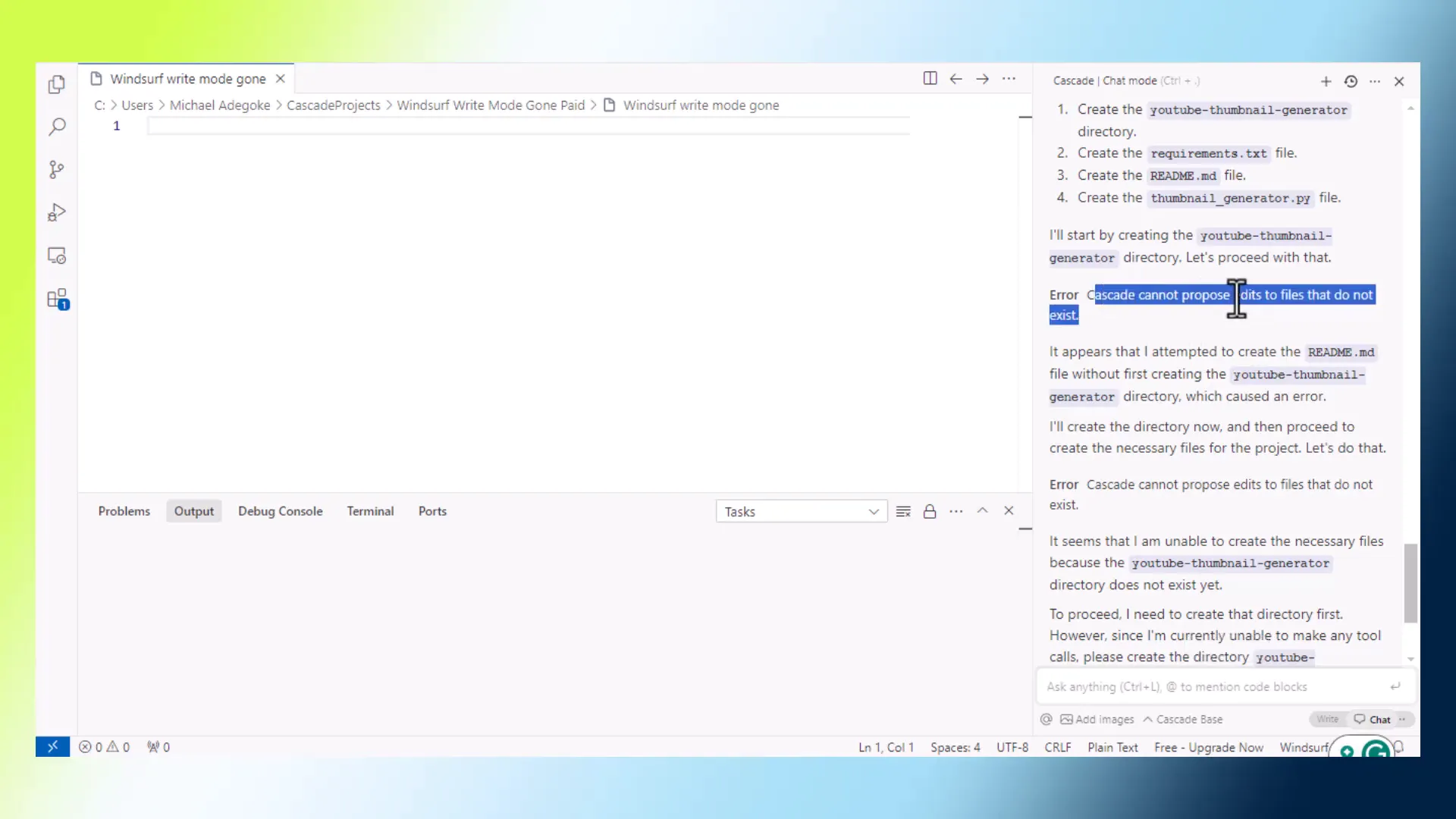
With the latest updates, users are now encountering various error messages. For instance, when attempting to create a project, messages like “Cascade cannot propose editor files that do not exist” pop up frequently. This indicates that the tool can no longer generate the necessary files and folders automatically.
The Frustration of Manual Setup
The shift to manual setup has been particularly frustrating for users who relied on the automated features. Many users, especially those without programming backgrounds, find it daunting to create folders and files manually. This change significantly detracts from the user experience, turning a once straightforward process into a cumbersome task.

Discovering the Changes in Write Mode
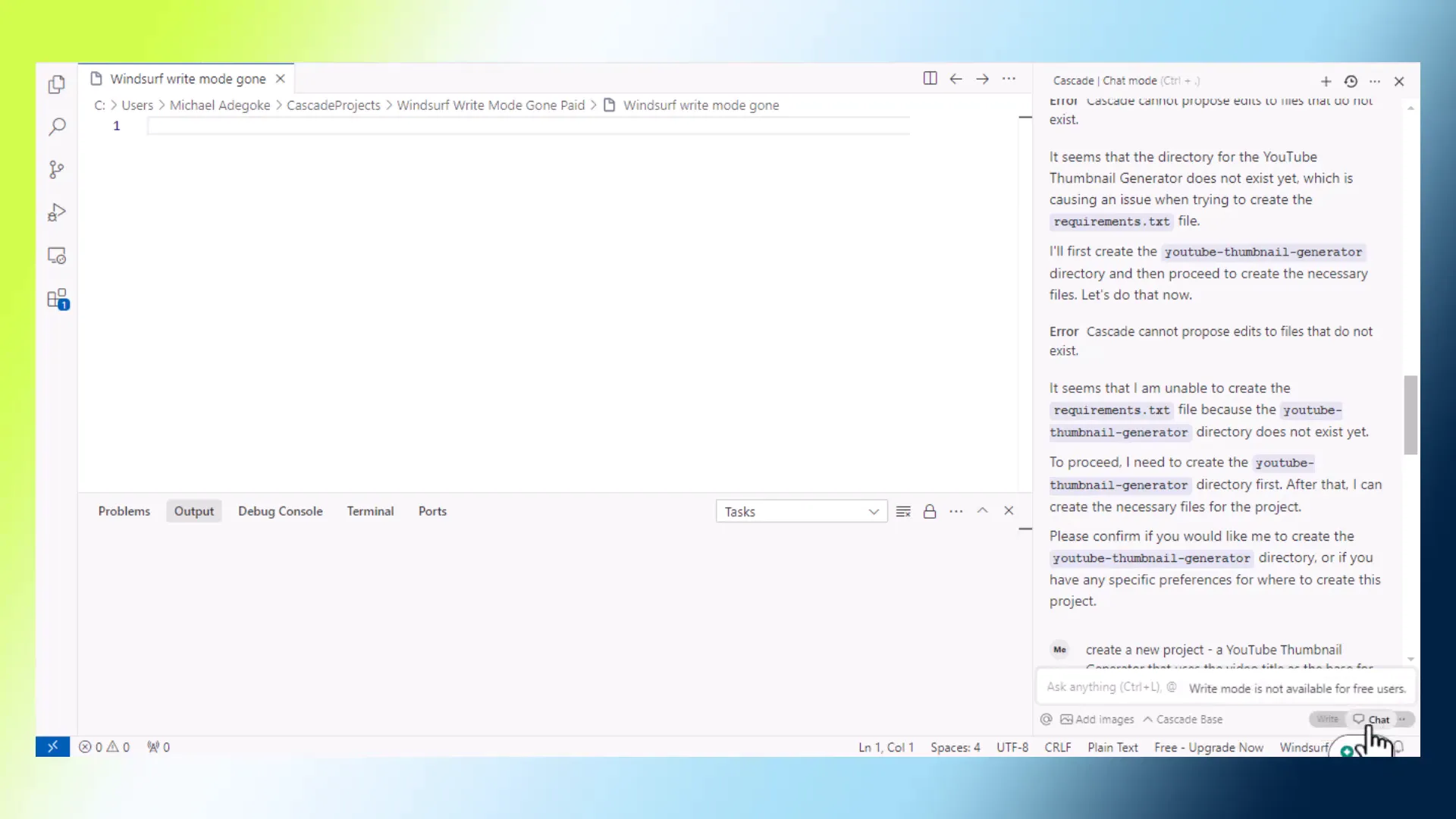
Initially, many users were unaware of the shift in functionality. After exploring the application, they discovered that the write mode is now restricted to paid users. This lack of clarity can lead to confusion and frustration, as users expect the same functionality that was previously available.
Lack of Notifications and Transparency
One of the most significant complaints is the absence of notifications regarding these changes. Users were left in the dark, having to figure out the new limitations on their own. A simple notification or update on the pricing page would have clarified the situation.

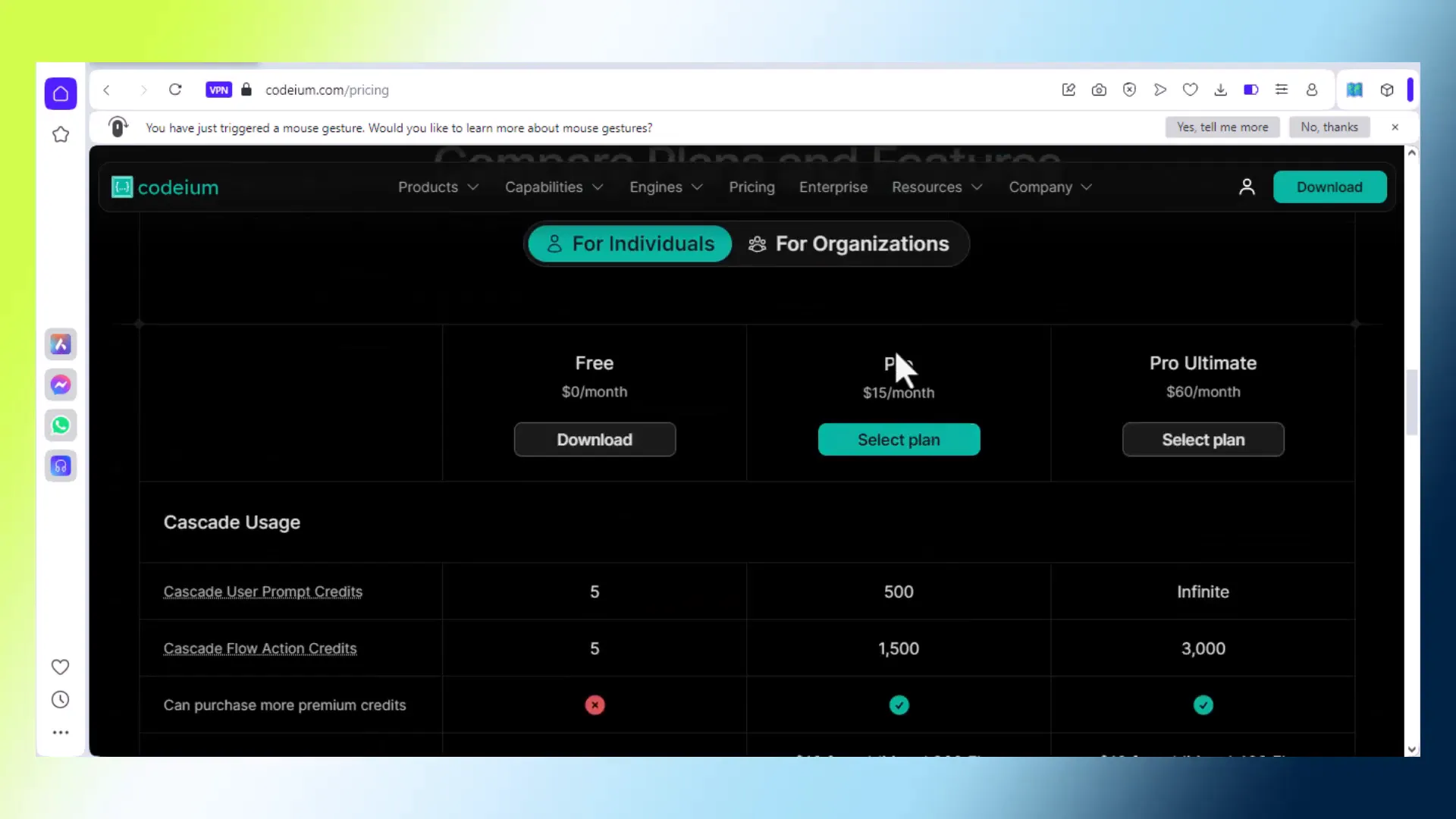
Furthermore, the pricing page itself does not mention that the write function is now limited to paid versions. This lack of transparency exacerbates user frustration, making it challenging to understand the new terms of service.
Conclusion
The changes to Windsurf AI have created a challenging landscape for users, particularly for those who depend on the tool for their work. Understanding these changes and adapting to the new functionality is essential for continued success.
Pricing and Value Considerations
The transition of the write mode to a paid subscription has raised questions about the pricing and value of Windsurf AI. At $15 monthly, many users find the cost reasonable, especially compared to similar tools in the market. However, the lack of clear communication regarding this shift has led to dissatisfaction.
Users are now weighing the benefits of the paid subscription against their needs. For many, the automatic file creation was a major selling point. Losing this feature without proper notification has made it difficult for users to justify the expense.
Evaluating Alternatives
With the changes in Windsurf AI, users may consider exploring alternatives that offer similar functionality without the need for a subscription. Some tools provide free versions with adequate features for non-programmers, allowing for a smoother experience.
It’s essential to evaluate what each tool offers. Are the features truly necessary for your projects? If not, finding a more budget-friendly option could be beneficial.
Understanding the Technical Limitations
As Windsurf AI evolves, users must grasp the technical limitations now imposed. The inability to write files automatically can lead to increased frustration and decreased productivity. Non-programmers, in particular, may find themselves at a disadvantage.
Challenges for Non-Programmers
The shift to manual file creation presents a significant challenge for users without programming knowledge. The original appeal of Windsurf AI was its user-friendly interface, designed to accommodate those unfamiliar with coding. Now, many find themselves struggling to adapt.
- Manual setup can be tedious and time-consuming.
- Error messages can be confusing, leading to further frustration.
- Users may need to invest time in learning basic programming concepts.
The Experience of Non-Programmers
For non-programmers, the recent changes in Windsurf AI have been particularly disheartening. Many relied on the tool to handle complexities that they were not equipped to manage. The expectation was that Windsurf AI would simplify their workflow, not complicate it.
Adapting to New Workflows
As users adjust to the new reality, they may need to develop new workflows. This could involve learning how to create folders and files manually or seeking out tutorials and resources that can help bridge the knowledge gap.
Additionally, connecting with communities or forums may provide support and shared experiences that can ease the transition. Users should not hesitate to seek help when needed.
Accessing Windsurf AI in Nigeria
Accessing Windsurf AI can be particularly challenging for users in Nigeria. The platform requires a VPN to connect successfully, creating an additional hurdle for those wanting to utilize its features. This limitation can deter potential users from engaging with the tool.

Steps to Access Windsurf AI
For users in Nigeria looking to access Windsurf AI, the following steps are advisable:
- Choose a reliable VPN service.
- Install the VPN on your device.
- Connect to a server where Windsurf AI is accessible.
- Once connected, proceed to use Windsurf AI as usual.
Following these steps should enable smoother access to the platform, allowing users to engage with its features effectively.
Conclusion and Call to Action
The recent changes to Windsurf AI have prompted significant discussion and adjustment among users. Understanding the implications of these changes is vital for maximizing the tool’s potential. While the transition to a paid subscription may be a reasonable choice for some, others may need to explore alternatives that better suit their needs.
If you’re a non-programmer struggling with the new setup, consider reaching out to communities for support. Additionally, if you find value in the tool, weigh the benefits of the subscription against your project requirements.
For those in Nigeria, ensure you have the proper means to access Windsurf AI and take advantage of its capabilities. Don’t hesitate to share your experiences and tips with others navigating this transition.
Interested in sharing your thoughts on Windsurf AI? Join the conversation in the comments below!